
What you get
- Every form counted from day one, with nothing to set up
- Any button, link or form as a goal with one attribute
- Goals from your own code with
readercount("Goal name") - Goals with no code at all using triggers
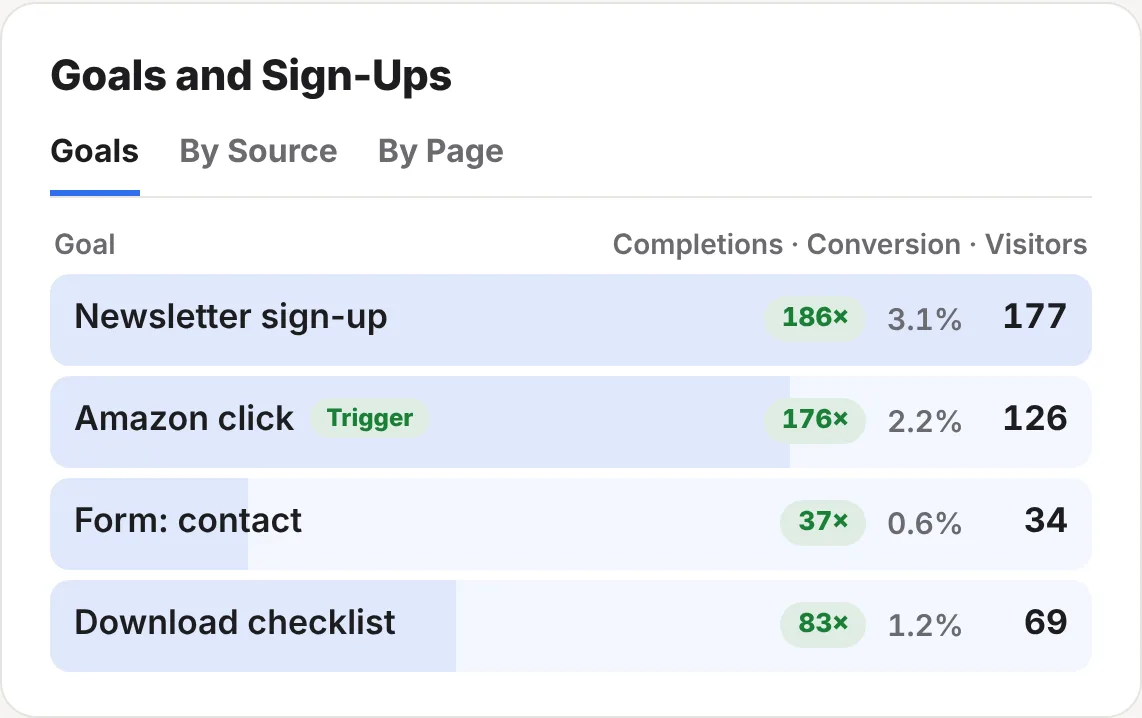
- Completions, conversion and visitors for each goal
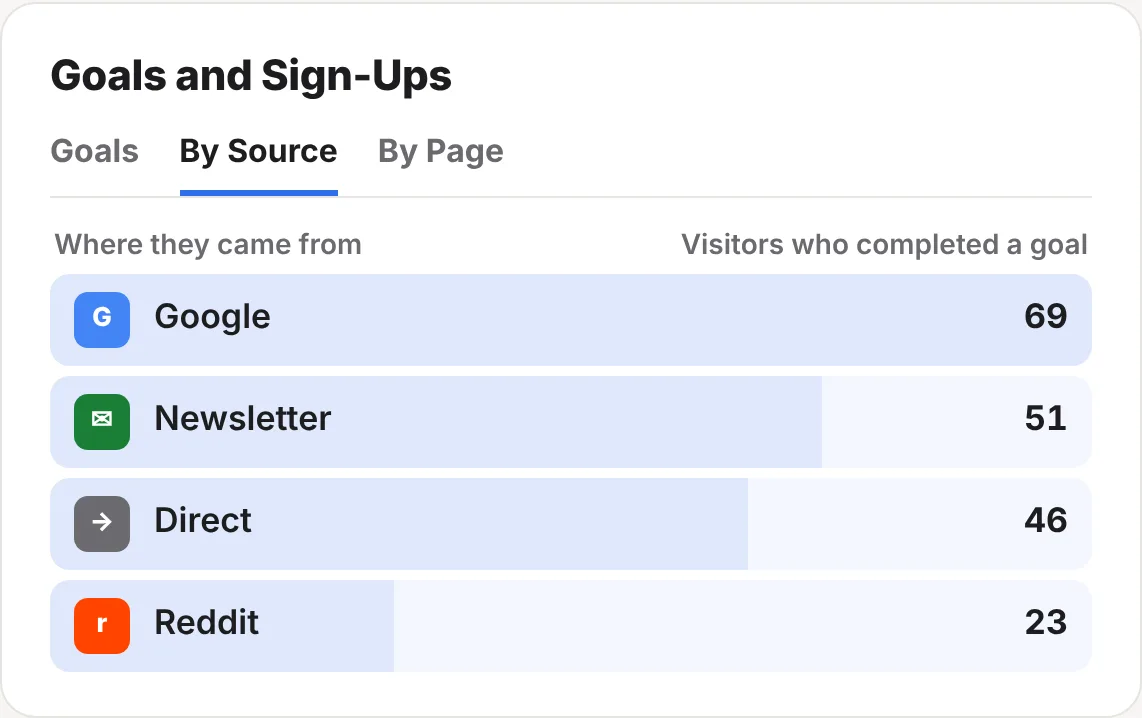
- Which sources and pages bring them in
- No tag manager, no extra script, no cookies
Four ways to count a goal
| Way | Best for | What you do |
|---|---|---|
| Forms, automatically | Contact and sign-up forms on your own pages | Nothing. Each form sent counts as Form: and its name. |
| An attribute | Buttons, links and forms you can edit | Add data-rc-goal="Newsletter sign-up" |
| Your own code | Checkouts, booking tools, apps | Call readercount("Purchase") |
| A trigger | When you can’t change the code | Set it up in Settings › Triggers |
<form action="/subscribe" data-rc-goal="Newsletter sign-up">
  …
</form>
<a href="/book/" data-rc-goal="Booked a call">Book a call</a>
Use the same name in more than one place and they add up to one goal, so a sign-up box in your sidebar and another at the end of each post can both be “Newsletter sign-up”. If your website already sends Plausible custom events, they’re counted as goals with the same names.
The step-by-step goals guide shows where to add each one on WordPress, Ghost and other website builders, how to count a thank-you page, and how to check it works.
Reading the Goals card
The Goals and Sign-Ups card has three tabs.
| Tab | What it shows |
|---|---|
| Goals | Each goal with its completions (how many times it happened), conversion (the share of your visitors who did it) and visitors (how many different visitors did it). Triggers have a Trigger tag. |
| By Source | Where the visitors who completed a goal came from. |
| By Page | The pages goals happened on. |
One visitor who signs up twice in a day counts as two completions and one visitor.
Ways to use goals
- Find your best sign-up posts. The By Page tab shows which posts turn readers into subscribers. Give those posts a better sign-up box.
- Compare sources fairly. Click a source on your stats page and the Goals card filters to it. Google may send more readers, while your newsletter or Reddit may send more who sign up.
- Check a change worked. Moved your sign-up box or shortened a form? Compare conversion before and after.
- See AI readers convert. Filter by ChatGPT or Perplexity from the Found by AI card and look at the Goals card.
Forms people give up on
When a reader starts filling in a form, ReaderCount notes the form’s name, never what they type. The Form Drop-Off tab on the Reader Engagement & Page Speed card shows how many people started each form and how many sent it.
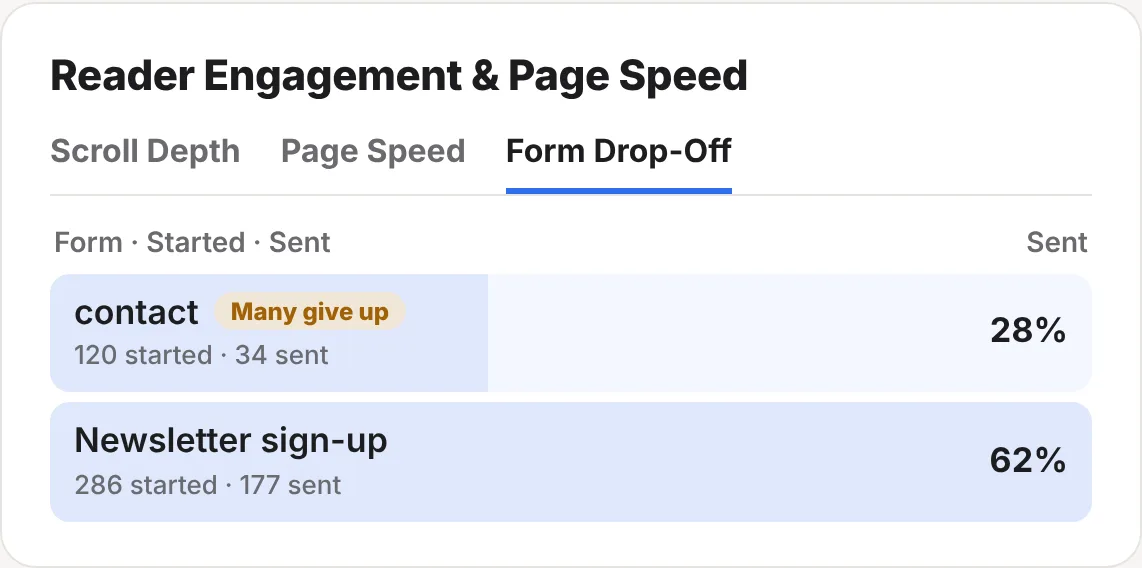
A form that at least 10 people started and fewer than 30% sent gets a Many give up label. That’s usually a sign of too many fields, a confusing step or something broken on phones.
The fine detail
| Names | Up to 80 characters. “Newsletter sign-up” and “newsletter signup” are two different goals, so keep names the same. |
| Privacy | ReaderCount counts that a goal happened, never who did it or what they typed. Never put personal details, such as an email address, in a goal name. |
| Public stats page | Goals show on your public stats page if you share one, but only goals completed by 3 or more visitors on a day. |
| Your own visits | Left out if you’ve told ReaderCount to ignore your browser, so test in a private window. |
| Plans | Included on every plan and in the 30-day trial. See plans and prices. |
Questions
Do goals need a tag manager or cookies?
No. Goals use the same small ReaderCount script you already have. There’s nothing else to load and still no cookies.
Can I see who completed a goal?
No. You see how many, from where and on which pages, never who.
My sign-up form is from another service. Can I count it?
Yes. If it sends people to a thank-you page on your website, count that page as a goal, with a line of code or a trigger. The goals guide shows how.
Will my past visits show for a new goal?
Goals added to your pages count from then on. Triggers are worked out from the visits ReaderCount already counted, so a new trigger shows its past straight away.
I use Plausible events. Do I need to change them?
No. Plausible custom events are counted as goals with the same names.
Still have a question? Get in touch and we’ll help.