

What you get
The live view is a page of its own, one click from your stats. It’s for the moments when you want to know what is happening now: the hour after a newsletter goes out, a post doing well on Reddit, or a quiet Sunday when you wonder if anyone is reading at all.
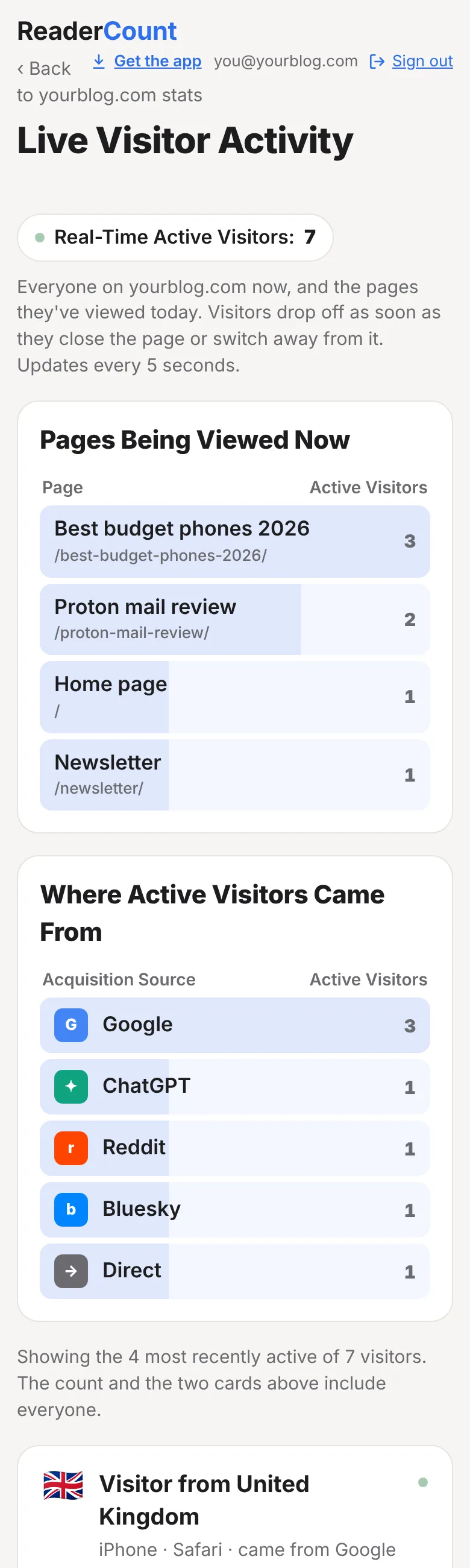
- How many people are on your site at this moment, updated every 5 seconds
- The pages they’re reading, with the busiest at the top
- Where they came from, such as Google, ChatGPT, Reddit or your newsletter
- A card for each reader with their country, device, browser and every page they’ve read today, with how long they spent on each
- Links clicked, files downloaded and goals completed, shown in each reader’s trail as they happen
- Still no cookies. A reader’s trail starts afresh every day and can’t be linked to anything else
How to open the live view
- Open your stats page and choose the website you want to watch.
- Look for the Real-Time Active Visitors button above the five numbers at the top. The dot turns green when someone is on your site.
- Click it. The live view opens and keeps itself up to date while it’s on screen. There’s nothing to refresh.
If you count more than one website, the names are listed across the top of the live view, so you can switch between them. Back to your stats at the top takes you to today’s figures for the same website.
Tip: pin ReaderCount to your phone’s home screen with Get the app at the top of your stats page. It opens like an app, so the live view is one tap away when you’ve just shared a post.
Reading the live view
The count
Real-Time Active Visitors is everyone on your website right now. A reader counts while their latest page is open and on screen. They drop off as soon as they close the page or switch to another tab or app, and come back if they return to it. A reader who leaves no sign of going drops off 5 minutes after their last page view.
Pages Being Viewed Now
The page each reader is on, with the number of readers on it. Each reader counts once, on the page they’re reading now, so this card always adds up to the count. Click a page to open it on your website.
Where Active Visitors Came From
How each reader first arrived on your site today: Google, Bing, ChatGPT, Reddit, Bluesky, a newsletter, a campaign you tagged, or Direct for people who typed your address or used a bookmark. These are the same names as on your sources card.
A card for each reader
Below the two cards, each reader on your site has a card of their own. The newest activity comes first. Each card shows:
| On the card | What it means |
|---|---|
| Visitor from United Kingdom | The country they’re reading in, with its flag. |
| iPhone · Safari · came from Google | Their kind of device, their browser and how they first arrived today. |
| Arrived 5m ago · 3 pages today | When their first page today opened, and how many pages they’ve read since. |
| The trail | Each page in the order they read it, with how long they spent on it. The page they’re on now is marked Now. |
| Clicked a link to Amazon | A click on a link to another website, named after the shop or site. |
| Downloaded a file | A click on a file such as a PDF, with its name. |
| Completed goal | A goal they completed, such as a newsletter sign-up. |
| The dot | Green while they’ve done something in the last minute. Grey when the page is open but they haven’t moved on for a minute or more. |
A card shows a reader’s latest 12 steps, with a line saying how many earlier steps there were today.
Ways to use it
- After you send a newsletter, watch which story people open first and whether they go on to read a second post.
- When a post is shared, see where the readers are coming from and which page they land on. If it’s an old post, it may be worth updating while people are reading it.
- When you publish, check the new post is being read and that the links in it work, as readers click through to them.
- When you change a page, see whether readers now click through to the next step or leave.
- On a quiet day, see that people are still reading, and which older posts keep bringing them in.
Leave your own visits out
Checking your own posts shouldn’t fill the live view with you. At the bottom of the live view there’s a Leave me out link for each of your websites.

- Open the link once in every browser you use: on your computer, your phone and your tablet.
- From then on, that browser isn’t counted on that website, in the live view or anywhere else in your stats.
- To be counted again, open your website with
#readercount-counton the end of the address.
The link works by adding #readercount-ignore to your website’s address. You can type that yourself on any page of your site. It’s the only thing ReaderCount ever stores in a browser, and only in yours.
How it works without cookies
Most live views follow people with a cookie or a stored ID. ReaderCount doesn’t. Instead, each reader is a scrambled code (a hash) made from the day, your website, their internet address and their browser, mixed with a secret that changes every day:
- The secret is replaced every day (at midnight UTC) and the old one is deleted, so today’s code can’t be matched to yesterday’s. A reader’s trail starts afresh each day.
- The code is different on every website, so a reader can’t be followed from your site to anyone else’s.
- The internet address itself is never stored, and the code can’t be turned back into it.
- The code never leaves our servers. The live view shows a country, a device and a trail of pages, never anything that says who someone is.
Nothing is stored on the reader’s device, so there’s no cookie banner to show. Read more on our cookie-free counting page and in our privacy policy.
The fine detail
| Updates | The live view fetches fresh figures every 5 seconds while it’s on screen. Your main stats page updates itself every 30 seconds. |
| Who counts as on the site | Anyone whose latest page is open and on screen, up to 5 minutes after their last page view. |
| Reader cards | The 50 most recently active readers get a card. The count and the two cards at the top always include everyone. |
| Trail length | The latest 12 steps today on each card. |
| Time on page | The time a page was actually on screen, not just open in a background tab. |
| Fake traffic | Bots, scripts and visits from cloud servers are left out here as everywhere else. See how fake traffic is filtered. |
| Plans | Included on every plan and in the 30-day trial. See plans and prices. |
Questions
Why does someone drop off the live view while they’re still on my site?
Readers drop off when they switch to another tab or app, and come back when they return to your page. If they leave the tab open in the background for more than 5 minutes, they’re no longer counted as on the site.
Can I see who a reader is?
No. You see their country, kind of device, browser and the pages they read today. ReaderCount never knows a reader’s name, email address or internet address, and it can’t link today’s visit to another day.
Why does a reader come from Direct?
Direct means the reader’s browser didn’t say where they came from. That’s usually a typed address or a bookmark, but some apps and email programs don’t pass it on either. Tag the links in your newsletter with utm_source=newsletter and those readers show as Newsletter instead.
Does the live view slow my website down?
No. The live view uses the same ReaderCount script as the rest of your stats, which is under 2 KB and loads after your page. There’s nothing extra to add.
Is the live view included in my plan?
Yes. Every ReaderCount plan includes the live view, and so does the 30-day trial.
Still have a question? Get in touch and we’ll help.