
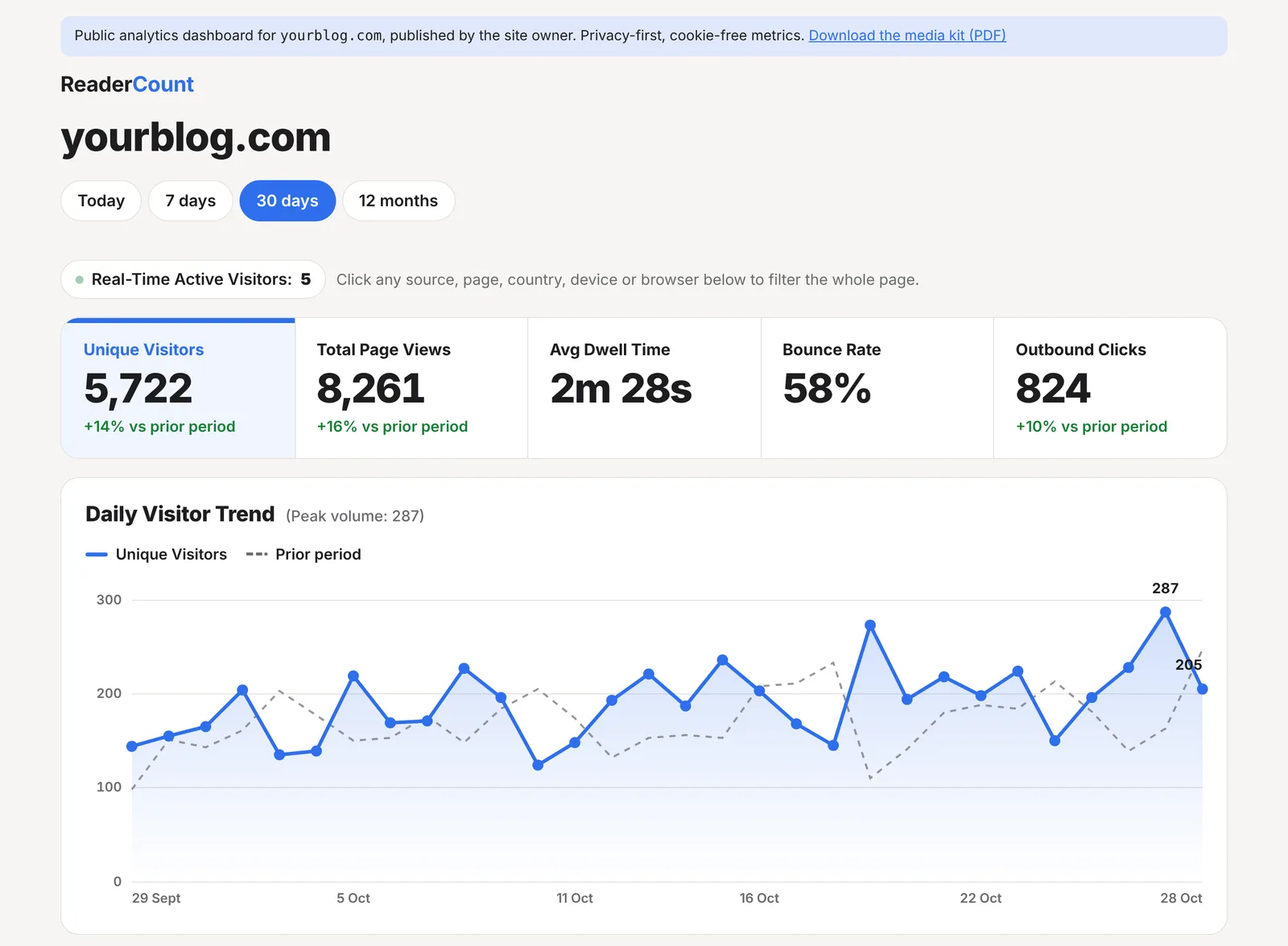
What you get
- A public stats page at its own address, with live numbers
- Off until you switch it on, and off again with one click
- Proof you run the website, checked before it can go public
- A “See my stats” badge for your footer, in light or dark
- A one-page media kit as a PDF, with your audience and a link back to the live numbers
- Your private things stay private: earnings, What to fix, Site Health and notes are never shown
How to switch it on
- Open Settings on your stats page and find Public Metrics Page. Click Manage.
- Tick Enable public metrics page. The first time, ReaderCount checks that you run the website.
- If it can’t tell yet, it gives you a verification tag to add inside the
<head>of your home page, or a TXT record to add to your DNS if you’d rather. Add one, wait a few minutes, then tick the box again. - Copy your link. Your page is at
app.readercount.com/share/yourblog.com.
<meta name="readercount-verify" content="…">The check is only needed once for each website. Untick the box at any time and the page stops working straight away.
What’s shown, and what isn’t
| Shown | Never shown |
|---|---|
| Visitors, page views, time on page and bounce rate, with the daily chart | Earnings and Earnings Insights |
| Top pages, sources, campaigns, countries, devices and browsers | What to fix |
| The number of readers on your website right now | Site Health, Site Problems and the Missing Page Report |
| Found by AI, once AI tools have sent you readers | Scroll depth, page speed and form drop-off |
| Link clicks and goals, if 3 or more visitors did them on a day | Your notes on the chart |
| Google searches, only if you tick Include my Google searches | Settings and anything about your account |
Visitors can choose Today, 7 days, 30 days or 12 months, and filter by source, page, country, device or browser, the same as on your own stats page.
Why only links and goals from 3 or more visitors? So a public page can never show what one reader did. A link only one person clicked stays private.
The badge
Once your page is public, Settings gives you a badge to paste into your website’s footer, so readers and sponsors can find your numbers:


Copy the light or the dark one to suit your website, or use a plain text link if you’d rather:
<a href="https://app.readercount.com/share/yourblog.com">See my stats</a> · counted by <a href="https://readercount.com/">ReaderCount</a>The media kit
Your public page has a Download the media kit (PDF) link at the top. It’s a one-page PDF a sponsor can save, print or forward, with:
- Visitors and page views for the last 30 days, and time on page
- Visitors each month for the last 12 months
- Countries and devices
- Your most-read posts
- A link back to your live public page, so they can check the figures for themselves
- A note that the owner has proved they run the website
The fine detail
| Search engines | Public stats pages ask search engines not to list them, so only people you give the link to will find it. |
| Older history | If you’ve brought in older stats, the chart and the media kit include them. |
| After your plan ends | The public page stops working until you choose a plan. |
| Plans | Included on every plan and in the 30-day trial. See plans and prices. |
Questions
Can anyone make my stats public?
No. Only the account that counts the website can, and only after showing it runs the website with a tag on its home page or a DNS record.
Will my earnings show?
Never. Earnings, What to fix, Site Health, problems and your notes stay on your own stats page.
Can I hide my Google searches?
Yes. They’re only shown if you tick Include my Google searches.
How do I make it private again?
Untick Enable public metrics page in Settings. The link stops working straight away.
Does the badge slow down my website?
It’s a small picture with a link. It runs no script and sets no cookies.
Still have a question? Get in touch and we’ll help.