
What you get
All three are tabs on the Reader Engagement & Page Speed card.
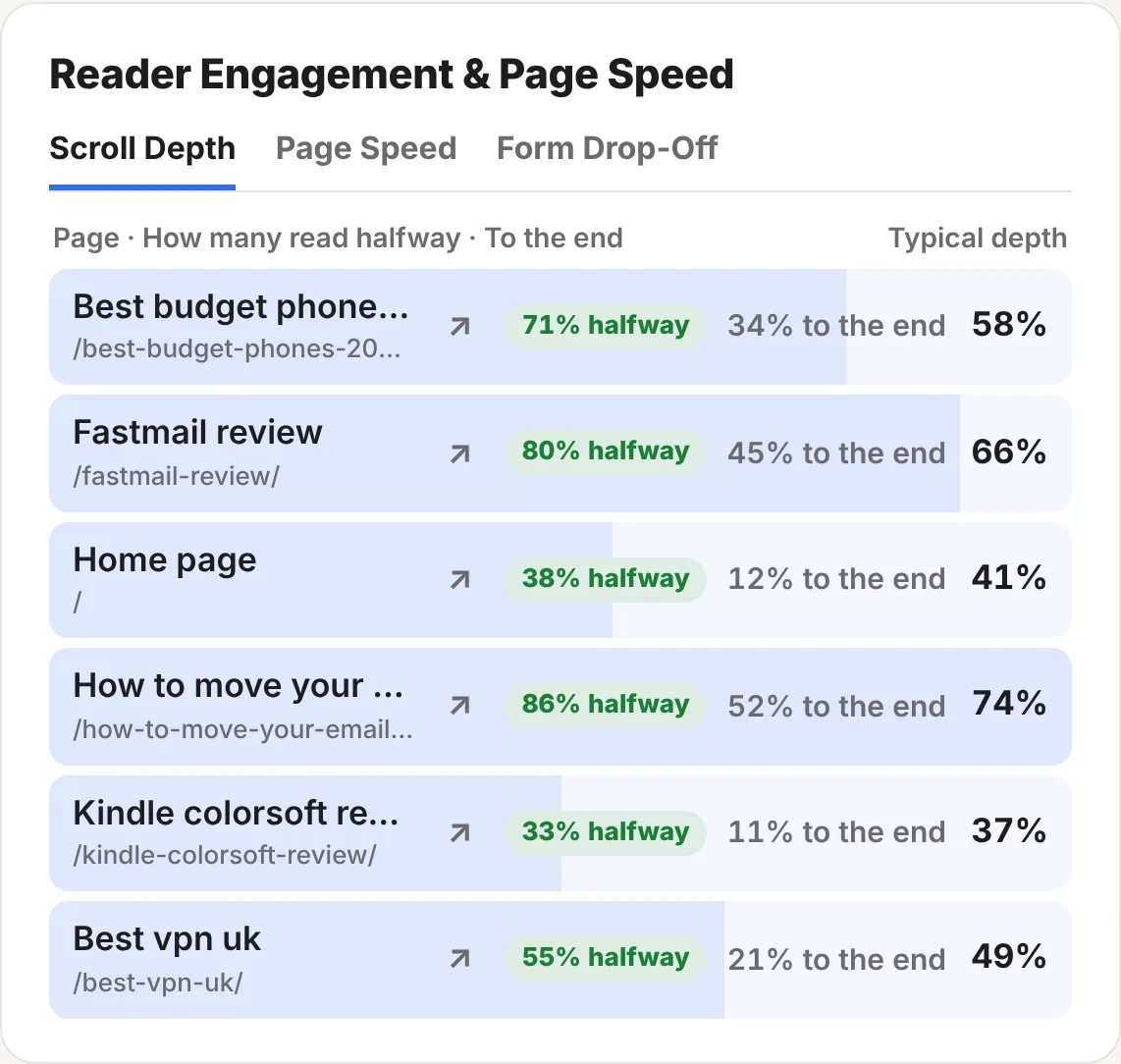
- Scroll Depth: how far down each page people typically read, how many got halfway and how many reached the end
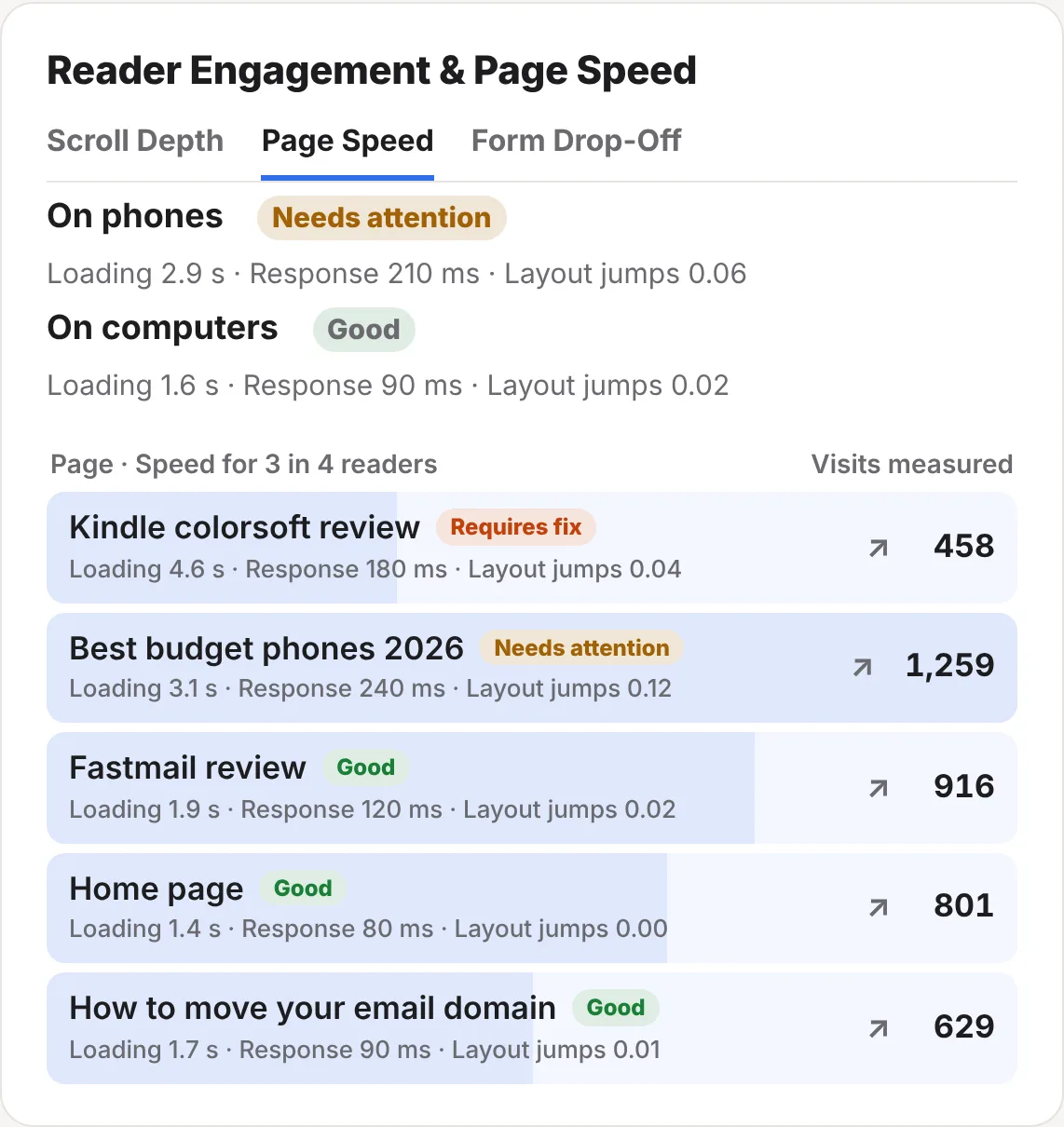
- Page Speed: Google’s Core Web Vitals from your real readers, on phones and on computers, rated Good, Needs attention or Requires fix
- Form Drop-Off: how many people started each form and how many sent it
- No setup, no extra script, and nothing that could follow a reader
Scroll depth
| Figure | What it means |
|---|---|
| Typical depth | How far down the page readers got, on average. |
| Halfway | The share of readers who got at least halfway down. |
| To the end | The share who got to the last tenth of the page. |
What to look for
- Few readers halfway: the opening isn’t holding them. Answer the question sooner and cut a long introduction.
- Many halfway, few to the end: the post may be longer than it needs to be, or the end isn’t worth reaching. Move your best advice and links higher.
- Most to the end: readers want more. Give them a next post to read and a sign-up box at the end.
Page speed
ReaderCount measures Google’s three Core Web Vitals in your readers’ own browsers, on the first page of each visit:
| Shown as | Google’s name | Good | Requires fix |
|---|---|---|---|
| Loading | Largest Contentful Paint (LCP): how long the main content takes to appear | 2.5 s or less | Over 4 s |
| Response | Interaction to Next Paint (INP): how quickly the page reacts to a tap or click | 200 ms or less | Over 500 ms |
| Layout jumps | Cumulative Layout Shift (CLS): how much things move about while loading | 0.1 or less | Over 0.25 |
Anything in between is Needs attention, and each page is rated by its worst figure. Like Google, ReaderCount shows the speed for 3 in 4 readers, so a page is only Good if it’s good for most people, not just on average.
The top of the tab gives your whole website on phones and on computers, because phones on mobile data are usually much slower. Under that, each page with its own figures and how many visits were measured.
Why real readers? Speed tests run on one fast computer. Your readers use old phones, busy trains and slow Wi-Fi. These are the figures Google looks at too.
Making a slow page faster
- Slow loading: usually the first big picture. Make it smaller, use a modern format such as WebP, and make sure it isn’t set to load lazily.
- Slow response: usually heavy scripts, such as ads, chat widgets or sliders. Remove what you don’t need, or load it later.
- Layout jumps: give pictures, adverts and embeds a fixed width and height so the page doesn’t move as they load.
Pages slower than 4 seconds for 1 in 4 readers also show in Site Health, and a slow page that people leave straight away shows in What to fix.
Form drop-off
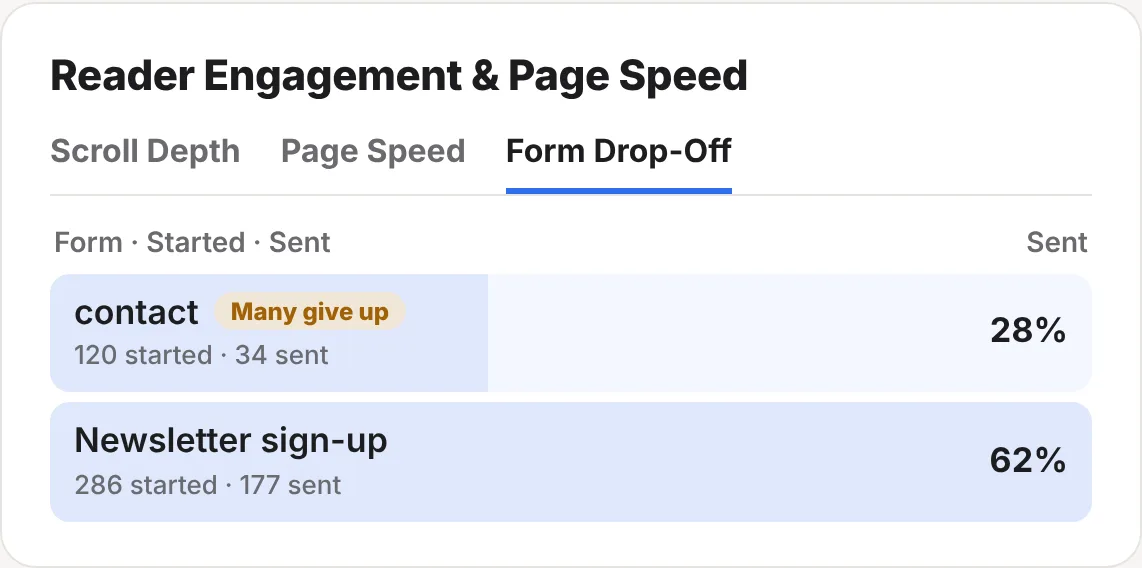
When a reader starts filling in a form, ReaderCount notes the form’s name. When they send it, that counts too. A form that 10 or more people started and fewer than 30% sent gets a Many give up label.
ReaderCount never sees what anyone types. Forms use the same name as their goal, so name a form with data-rc-goal and both use that name.
The fine detail
| Enough readers | A page needs at least 5 measured visits before its scroll depth or speed is shown. |
| First page only | Speed is measured on the first page of each visit, where a slow page loses the most readers. |
| Monthly allowance | Form reports share the problem allowance: 20,000 a month on Solo, 200,000 on Business. |
| Privacy | Just numbers for each page: no recordings, no mouse movements, nothing anyone typed. |
| Plans | Included on every plan and in the 30-day trial. See plans and prices. |
Questions
Does measuring speed slow my pages down?
No. The figures come from the browser’s own measurements, and are sent with the time on page as the reader leaves.
Why are my figures different from PageSpeed Insights?
PageSpeed Insights runs a test from one machine, or shows Google’s figures for the last 28 days. ReaderCount shows your own readers for the dates you choose.
Why is a page missing from the list?
It needs at least 5 measured visits in the dates you chose. Choose a longer date range to see quieter pages.
Is this a heatmap or session recording?
No. ReaderCount keeps how far down the page each reader got, as a number. Nothing that could replay or follow a reader.
Can I see what people typed before they gave up on a form?
No, and nor can anyone else. ReaderCount only knows the form was started and whether it was sent.
Still have a question? Get in touch and we’ll help.