
What you get
Google sends most bloggers more readers than anywhere else, but it doesn’t tell your website what people searched. Google Search Console does, and ReaderCount brings those figures onto your stats page, next to everything else, so you don’t need to open two tools.
- The searches that show your pages in Google, biggest first
- Clicks: how many people clicked through to you from each search
- Impressions: how many times your pages appeared in the results
- Average position: where you usually appear, where 1 is the top
- Totals for the dates you choose, in the card’s heading
- Suggestions in What to fix when a page slips down Google, or appears often but is rarely clicked
- Read-only access. ReaderCount can’t change anything in your Google account
How to connect Search Console
You need your website in Google Search Console first. If it isn’t there yet, Google’s own steps take a few minutes, and figures start to arrive in Search Console a few days later.
- Open your stats page and scroll to the Organic Search Performance card.
- Click the Google button and sign in with the Google account that has your website in Search Console.
- Allow read-only access to Search Console on Google’s page. You’re then sent back to your stats.
- Wait a minute and refresh. ReaderCount copies the last 90 days straight away, then adds each new day overnight.
One Google connection covers every website on your ReaderCount account. Each website is matched to its Search Console property: a Domain property if you have one (such as sc-domain:yourblog.com), otherwise the https:// address.
Website in a different Google account? In Search Console for that website, open Settings, then Users and permissions, and add the Google account you connected to ReaderCount as a user. Restricted is enough. The figures arrive with the next nightly copy, with nothing to change in ReaderCount.
Reading the card
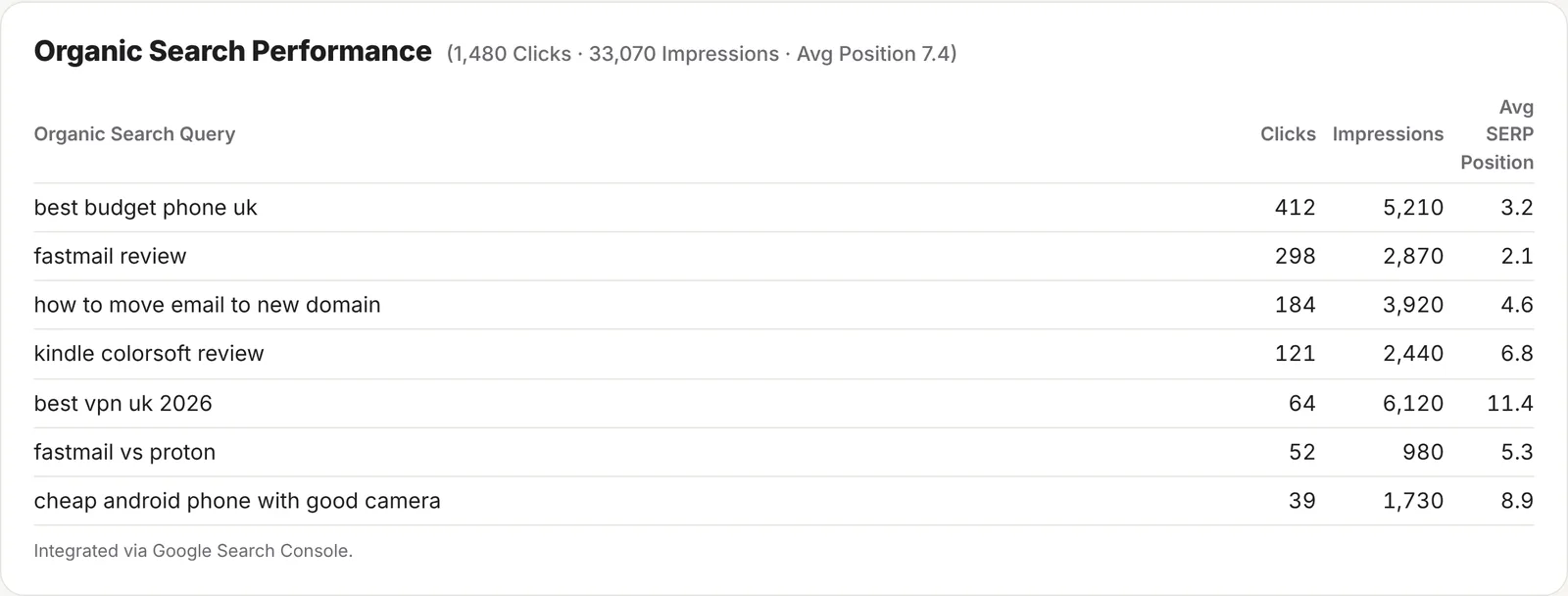
| Column | What it means |
|---|---|
| Organic Search Query | What someone typed into Google when one of your pages appeared. |
| Clicks | How many times someone clicked through to your website from that search. |
| Impressions | How many times one of your pages was shown in the results for it, whether or not anyone scrolled down to it. |
| Avg SERP Position | Your average place in the results, where 1 is the top. Positions 1 to 10 are usually Google’s first page. |
The card lists your top 15 searches for the dates you choose, sorted by clicks. The heading gives the totals for all your searches, including the ones further down the list.
What to look for
- Lots of impressions, few clicks: people see you but choose another result. A clearer title or description often helps.
- Position 8 to 20: you’re close to the top of Google’s first page, or just off it. Updating the post can be enough to move it up.
- Searches you didn’t expect: ideas for new posts, or for a section to add to an existing one.
Suggestions in What to fix
Once Search Console is connected, the What to fix this week list at the top of your stats page uses your Google figures as well as your visitors. It compares the last four weeks with the four before and points out, biggest wins first:
- Pages slipping down Google, with their old and new average position and what that did to their clicks.
- Pages shown near the top but rarely clicked, where the title or description is usually the problem.
- Searches where you’re almost on page one: at least 100 impressions at an average position between 8 and 20.
When the figures arrive
- Google’s figures arrive two or three days late. That’s Google, not ReaderCount: Search Console itself shows the same delay.
- ReaderCount copies them every night, and fetches the last five days again each time, because Google fills in and corrects recent days as they settle.
- When you choose Today or Yesterday, Google hasn’t sent those days yet, so the card shows Google’s latest week instead, and says which dates it’s showing.
- When you first connect, or add a website to Search Console later, ReaderCount copies its last 90 days.
The card shows when the figures were last copied, and an Open in Google Search Console link takes you to Google’s own report for the same website.
Access, privacy and disconnecting
- Read-only. ReaderCount asks Google for permission to read Search Console figures, and nothing else. It can’t change your settings, your sitemaps or anything else in your Google account.
- Your sign-in is kept encrypted. Google gives ReaderCount a key to fetch your figures each night. It’s stored encrypted and never shown to anyone.
- Your figures stay yours. They’re never sold, never used for advertising and never used to train AI.
- Disconnect any time. Disconnect Google on the card hands the access back to Google and deletes every search figure ReaderCount copied for your websites.
Read more in the Google section of our privacy policy.
The fine detail
| Searches shown | Your top 15 for the dates you choose, by clicks, then impressions. |
| Web results | The figures are for Google’s web results. Image, video and News results aren’t included. |
| Rare searches | Google leaves out searches made by very few people, to protect searchers’ privacy, so the totals in the heading can be higher than the rows add up to. |
| http and www | When your pages appear under more than one address, such as with and without www, their figures are added together. |
| Ask Claude | With the Claude connector, ask “what do people search on Google to find my reviews?” and Claude reads the same figures. |
| Plans | Included on every plan and in the 30-day trial. See plans and prices. |
Questions
Do I need Google Analytics for this?
No. Search Console is a separate, free Google tool for website owners, and it doesn’t put anything on your pages. ReaderCount replaces Google Analytics; Search Console tells you about Google’s search results.
Why don’t Google’s clicks match my visitors from Google?
They measure different things. Search Console counts clicks on Google’s results. ReaderCount counts readers whose page loaded. Someone who clicks and goes back before the page loads is a click but not a visitor.
Why are Today’s searches the same as last week’s?
Google’s figures arrive two or three days late. When you choose dates Google hasn’t sent yet, the card shows Google’s latest week and says so.
It says it can’t find my website. What do I do?
The Google account you connected doesn’t have your website in its Search Console. Either connect the Google account that does, or add the connected account as a user of that website in Search Console, under Settings, then Users and permissions.
Can ReaderCount change anything in my Google account?
No. It has read-only access to Search Console figures and nothing else, and you can remove it at any time from the card or from your Google account.
Still have a question? Get in touch and we’ll help.